> ## Documentation Index
> Fetch the complete documentation index at: https://docs.papp.sa/llms.txt
> Use this file to discover all available pages before exploring further.
# Testing Credentials
> Sandbox environment and test identities
Use sandbox before any production launch. The API shape is the same as production, but credentials and merchant configuration are isolated.
## What you need from Points
Sandbox registration is self-service. Create your sandbox merchant account directly at [sandbox.papp.sa](https://sandbox.papp.sa) — no email request needed.
After registration, you will get access to:
* sandbox Public key (`points_public_key`)
* sandbox Private key (`points_private_key`)
Both keys are available from your merchant dashboard after login. Production and sandbox credentials are separate — keys never cross environments.
If you need your merchant capabilities adjusted (earning vs checkout vs both), you can configure them from your sandbox dashboard settings.
Production and sandbox credentials are separate. Keys never cross environments.
## What stays the same in sandbox
The following remain the same as production:
* request and response JSON shape
* authentication model
* endpoint paths
* webhook registration model
* order lifecycle concepts
## Test phone numbers
Use these reserved sandbox numbers to validate different scenarios. Each number is mapped to a specific account state so you can reproduce the same flow consistently.
| Phone Number | Account State | What to test |
| ------------ | ---------------------------------- | ---------------------------------------------------------------------------------- |
| 500000002 | Active account, no points balance | Earning flow — customer completes a purchase and earns points |
| 500000001 | Active account with points balance | Redemption flow — customer uses existing points to pay |
| 500000003 | No account on Points | Error handling — expect the message `للاسف ما عندك حساب في بوينتس` to be displayed |
Notes:
* These numbers work in sandbox only. Do not use them in production.
* Reuse the same numbers across regression tests so order history stays traceable.
* If you need a fresh account state, contact support to reset the test identity.
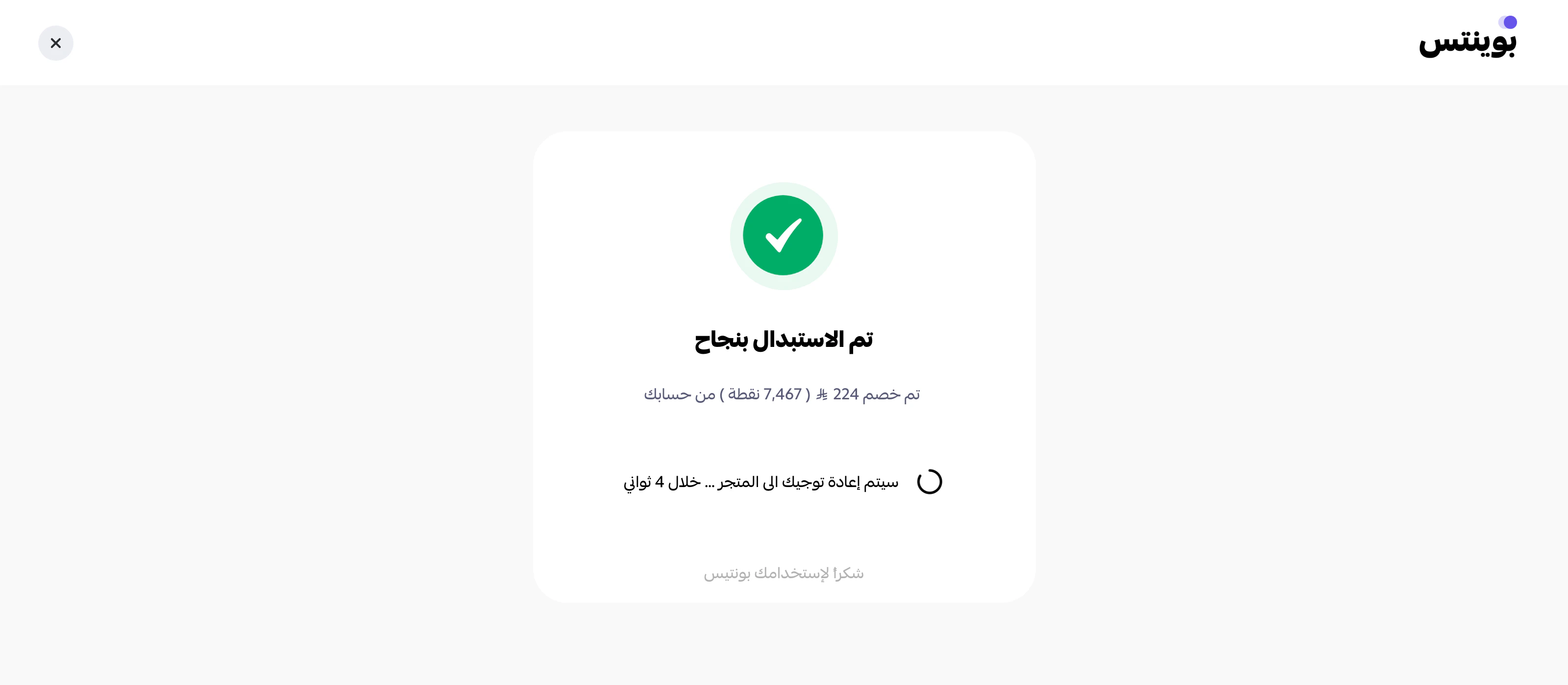
## Visual redemption walkthrough
Use the reference screens below when validating the in-app redemption journey in sandbox.
The flow below is a redemption flow and should be tested with the sandbox identity that has an active account with points balance (`500000001`).
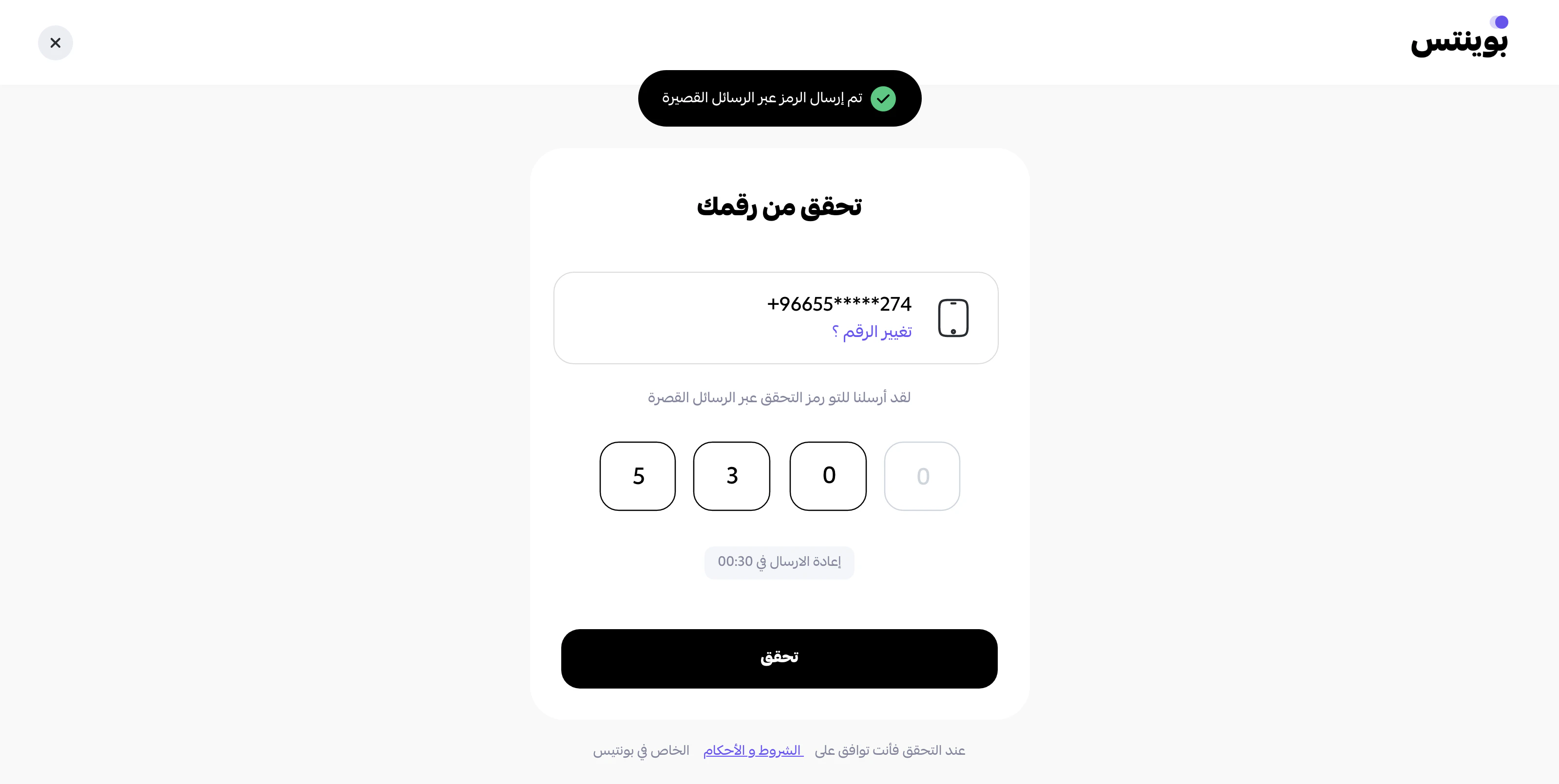
### Step 1
Verify the customer phone number using the OTP code.
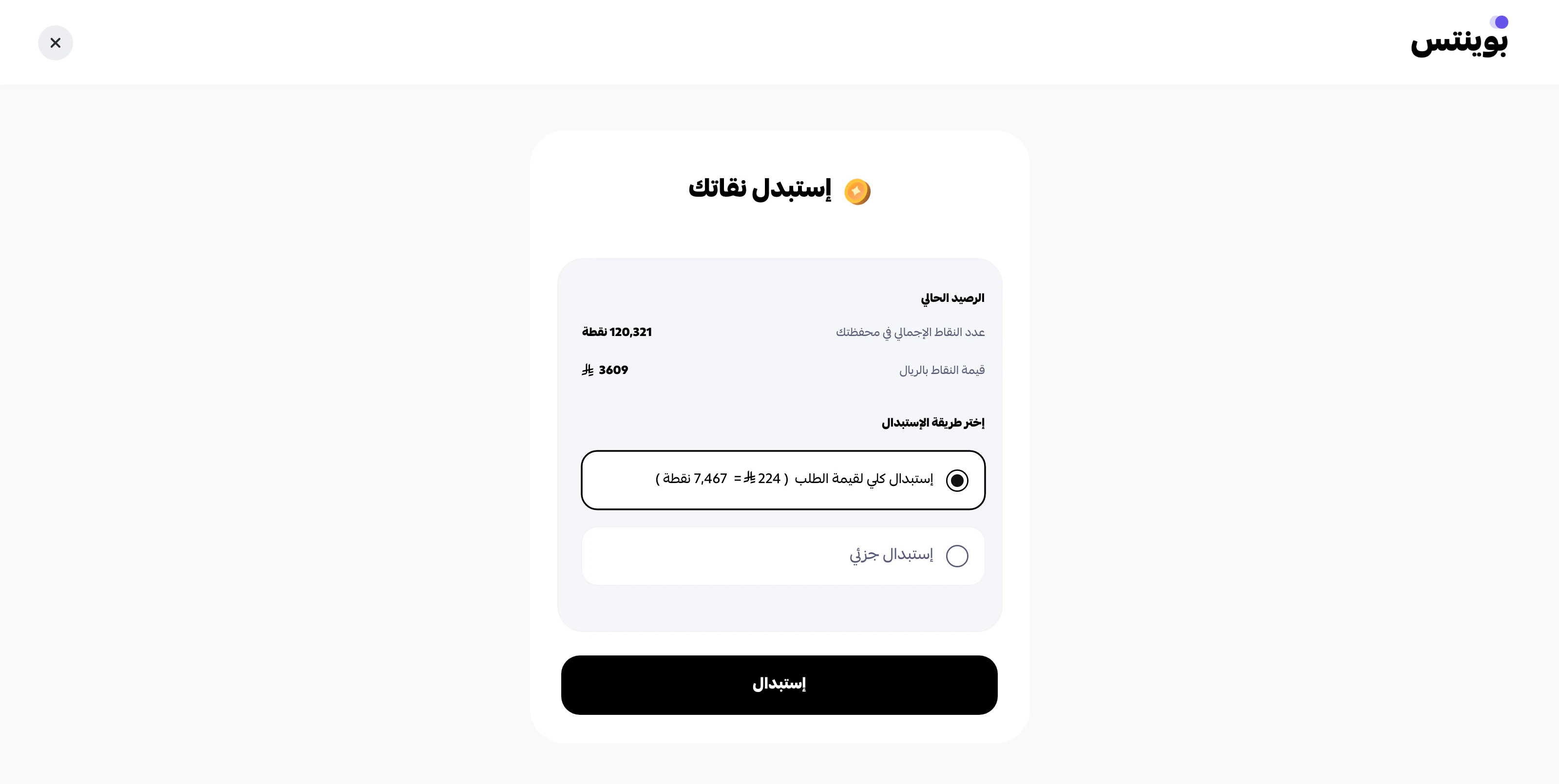
 ### Step 2
Pay the full order value using points.
### Step 2
Pay the full order value using points.
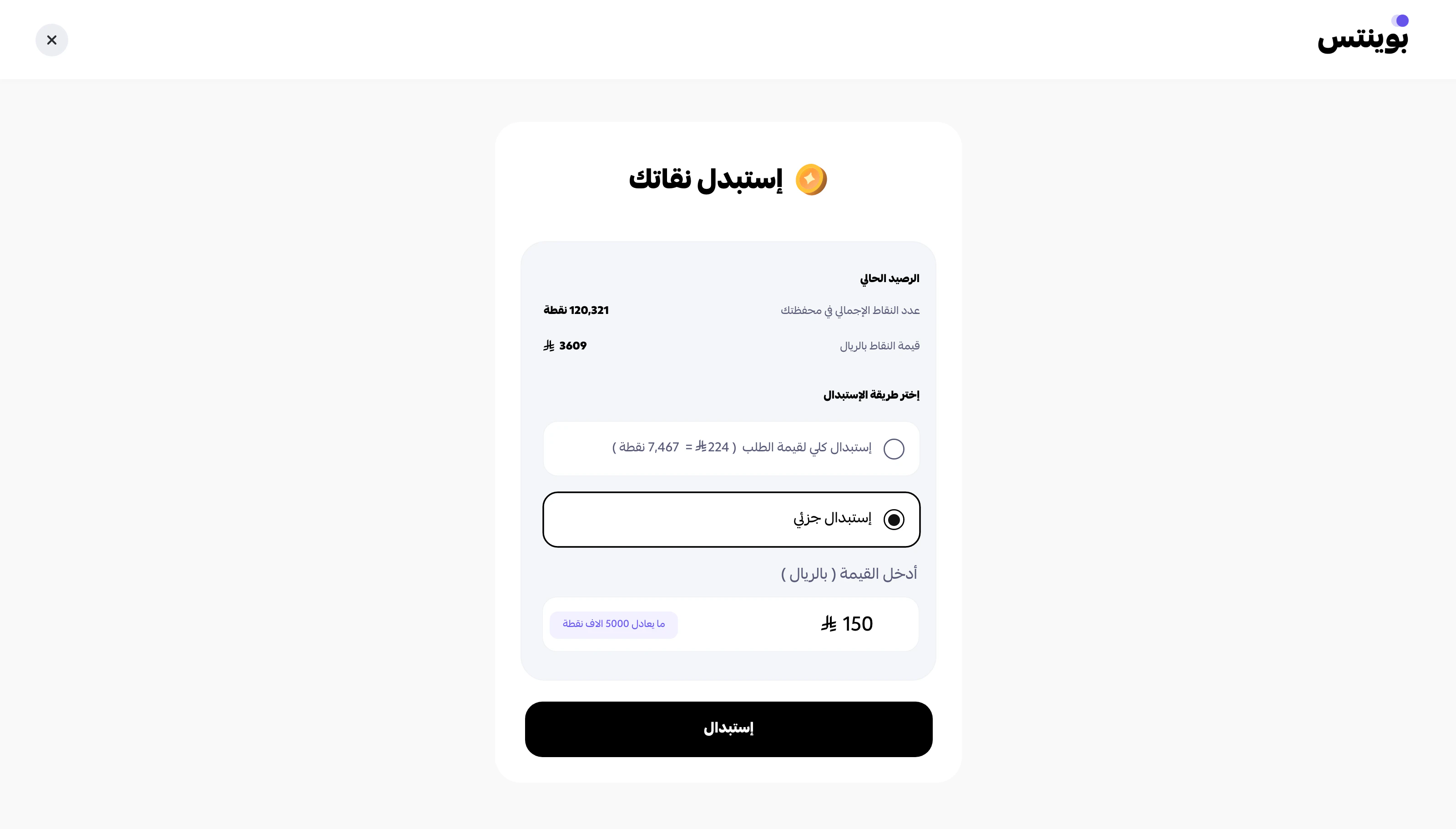
 ### Step 3
Pay part of the order value using points, and complete the remaining amount using another payment method.
### Step 3
Pay part of the order value using points, and complete the remaining amount using another payment method.
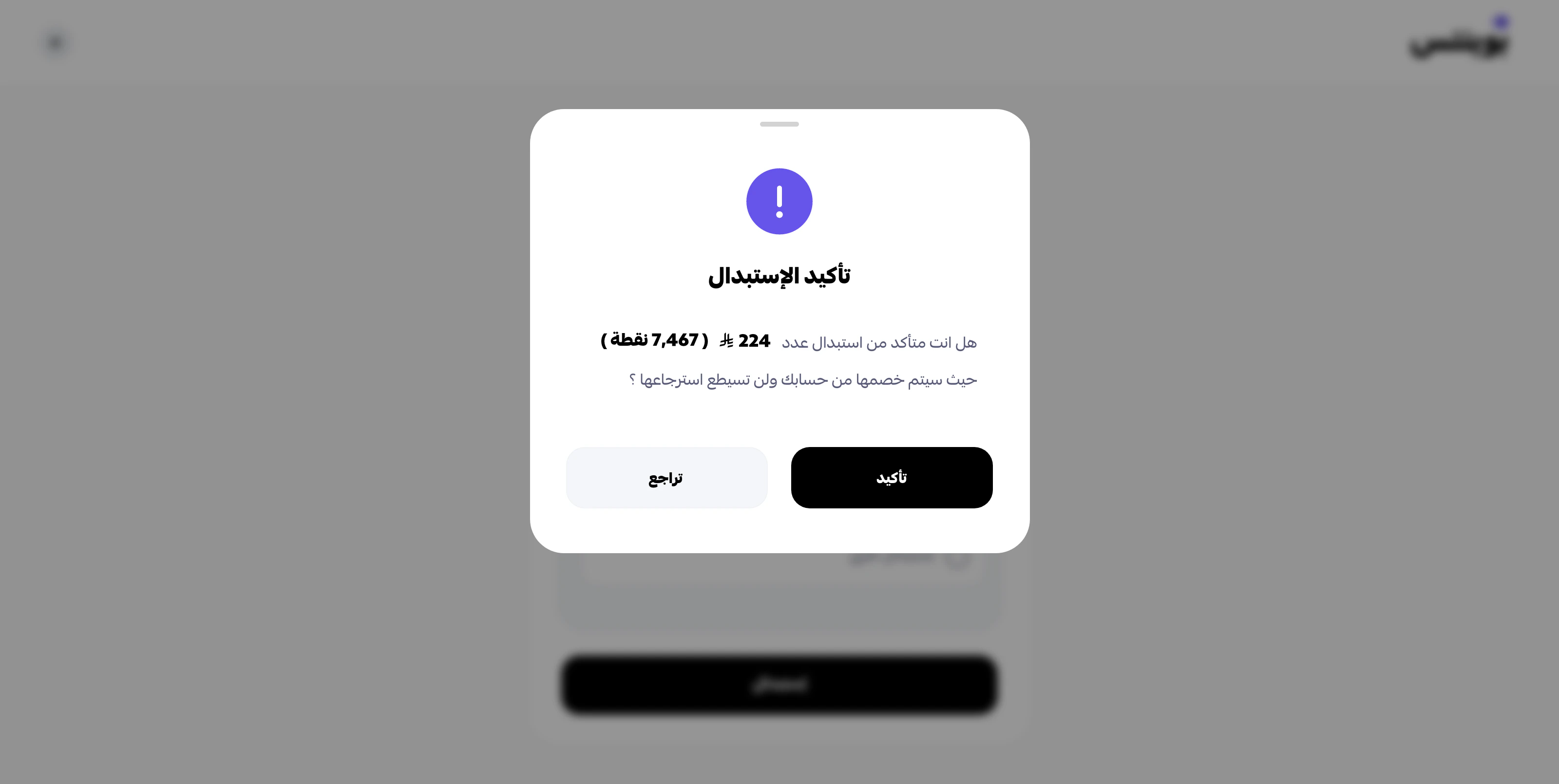
 ### Step 4
Review the confirmation popup before completing the redemption.
### Step 4
Review the confirmation popup before completing the redemption.
 ### Step 5
Confirm that the redemption is completed successfully.
### Step 5
Confirm that the redemption is completed successfully.
 ## Suggested sandbox setup
Prepare these environment variables:
```bash theme={null}
POINTS_BASE_URL=https://sandbox.papp.sa/api/v1
POINTS_API_KEY=your_sandbox_private_key
POINTS_PUBLIC_KEY=your_sandbox_public_key
POINTS_WEBHOOK_URL=https://your-staging-domain.example.com/webhooks/points
```
## Minimum test matrix
Before go-live, validate at least:
1. successful earning order
2. successful checkout session creation
3. successful webhook registration
4. `approved` webhook handling
5. `cancelled` webhook handling
6. `refunded` webhook handling if refunds are part of your flow
7. shipping status update if you fulfil physical goods
## Additional test scenarios
Beyond the minimum matrix, consider running these scenarios to cover edge cases before go-live:
### Order lifecycle
* Authorize then capture — full successful checkout with redemption
* Authorize then cancel before capture — abandoned cart recovery
* Capture then complete — final lifecycle transition
* Full refund after capture — verify refunded webhook handling
* Partial refund (if enabled on your merchant) — verify adjusted refund amount
### Earning scenarios
* Earn-only order without redemption — customer pays full amount, earns points
* Customer with existing balance places an earning-only order — verify balance increment
### Redemption scenarios
* Redeem exact available balance — zero remaining balance after order
* Attempt to redeem more than available — expect validation error
* Redeem with insufficient cart amount — expect minimum-order-value error
### Authentication & validation
* Invalid API key — expect HTTP 400
* Missing required fields in request body — expect validation error
* Malformed phone number — expect normalization error
* Request without Public key where required — expect auth error
### Webhooks
* Register a webhook that returns 500 — verify retry behavior
* Register a webhook with invalid signature handling — verify delivery logs
* Unregister a webhook mid-flow — verify no further delivery attempts
## Staging webhook recommendation
Register a staging webhook URL against sandbox, not your local machine, for repeated tests. Use tunnelling only for short manual debugging sessions.
## See also
* [API keys](/authentication/api-keys#environments) — environment-by-environment credential handling.
* [Go-live checklist](/testing/go-live-checklist) — what to verify before switching to production keys.
## Suggested sandbox setup
Prepare these environment variables:
```bash theme={null}
POINTS_BASE_URL=https://sandbox.papp.sa/api/v1
POINTS_API_KEY=your_sandbox_private_key
POINTS_PUBLIC_KEY=your_sandbox_public_key
POINTS_WEBHOOK_URL=https://your-staging-domain.example.com/webhooks/points
```
## Minimum test matrix
Before go-live, validate at least:
1. successful earning order
2. successful checkout session creation
3. successful webhook registration
4. `approved` webhook handling
5. `cancelled` webhook handling
6. `refunded` webhook handling if refunds are part of your flow
7. shipping status update if you fulfil physical goods
## Additional test scenarios
Beyond the minimum matrix, consider running these scenarios to cover edge cases before go-live:
### Order lifecycle
* Authorize then capture — full successful checkout with redemption
* Authorize then cancel before capture — abandoned cart recovery
* Capture then complete — final lifecycle transition
* Full refund after capture — verify refunded webhook handling
* Partial refund (if enabled on your merchant) — verify adjusted refund amount
### Earning scenarios
* Earn-only order without redemption — customer pays full amount, earns points
* Customer with existing balance places an earning-only order — verify balance increment
### Redemption scenarios
* Redeem exact available balance — zero remaining balance after order
* Attempt to redeem more than available — expect validation error
* Redeem with insufficient cart amount — expect minimum-order-value error
### Authentication & validation
* Invalid API key — expect HTTP 400
* Missing required fields in request body — expect validation error
* Malformed phone number — expect normalization error
* Request without Public key where required — expect auth error
### Webhooks
* Register a webhook that returns 500 — verify retry behavior
* Register a webhook with invalid signature handling — verify delivery logs
* Unregister a webhook mid-flow — verify no further delivery attempts
## Staging webhook recommendation
Register a staging webhook URL against sandbox, not your local machine, for repeated tests. Use tunnelling only for short manual debugging sessions.
## See also
* [API keys](/authentication/api-keys#environments) — environment-by-environment credential handling.
* [Go-live checklist](/testing/go-live-checklist) — what to verify before switching to production keys.